来源:OpenAI 官方文档
原文链接:https://developers.openai.com/api/docs/guides/function-calling
Function calling 也常被称为 tool calling。它的核心价值是:让大模型不只“生成文本”,而是能够在你的应用里调用外部能力,例如查询天气、读取账户信息、执行退款、调用内部服务,或者把结构化参数交给你自己的业务代码处理。
这篇文章基于 OpenAI 官方文档整理,重点讲清以下几件事:
- 什么是工具、工具调用、工具结果
- 一次完整的函数调用工作流怎么跑通
- 如何定义函数 schema,如何让输出更稳定
Responses API与Chat Completions API的典型写法- 严格模式、并行调用、流式调用要注意什么
- 什么是自定义工具,以及何时适合用 grammar 约束输入
如果你的应用里工具很多、schema 很大,还可以结合 tool search 按需延迟加载工具。官方文档说明:只有 gpt-5.4 及之后的模型支持 tool_search。
一、先建立三个核心概念
在 OpenAI 的术语里,和函数调用相关的对象主要有三类。
1. 工具(Tools)
工具是你告诉模型“它可以使用的能力”。
例如:
- 获取某个城市今天的天气
- 根据用户 ID 查询账户详情
- 为订单执行退款
这些能力本身并不在模型内部执行,而是由你的应用提供。模型只是决定“是否需要调用”,并生成调用该工具所需的参数。
2. 工具调用(Tool Calls)
当模型读完用户输入后,如果判断仅靠当前上下文不足以完成任务,就可能返回一个工具调用请求。
例如用户问:
巴黎今天天气怎么样?
模型可能不会直接编造答案,而是返回一个对 get_weather 工具的调用,并带上参数 location = Paris。
3. 工具调用结果(Tool Call Outputs)
工具调用结果是你在应用侧真正执行完逻辑后,再回传给模型的内容。
它可以是:
- JSON
- 普通文本
- 图片内容
- 文件内容
官方文档强调,工具结果需要和具体的调用关联起来,通常通过 call_id 或 tool_call_id 进行绑定。
二、函数工具和其他工具有什么区别
OpenAI 文档里,“工具”是更大的概念,“函数”只是其中一种。
function:基于 JSON Schema 定义输入参数,适合结构化调用custom:输入输出可以是自由文本,更适合代码片段、受 grammar 约束的文本等场景- 内建工具:OpenAI 平台自带的一类工具,例如 web search、code interpreter、remote MCP
如果你的目标是“让模型产出稳定的结构化参数,再由业务代码执行”,通常优先使用 function。
三、完整工作流:一次函数调用到底怎么走
函数调用本质上是你的应用和模型之间的一段多轮协作。官方文档把它概括成五步:
- 向模型发起请求,并附带可调用工具列表
- 接收模型返回的工具调用
- 在应用侧执行真实逻辑
- 把执行结果作为工具输出再发回模型
- 获取模型的最终回答,或者继续下一轮工具调用
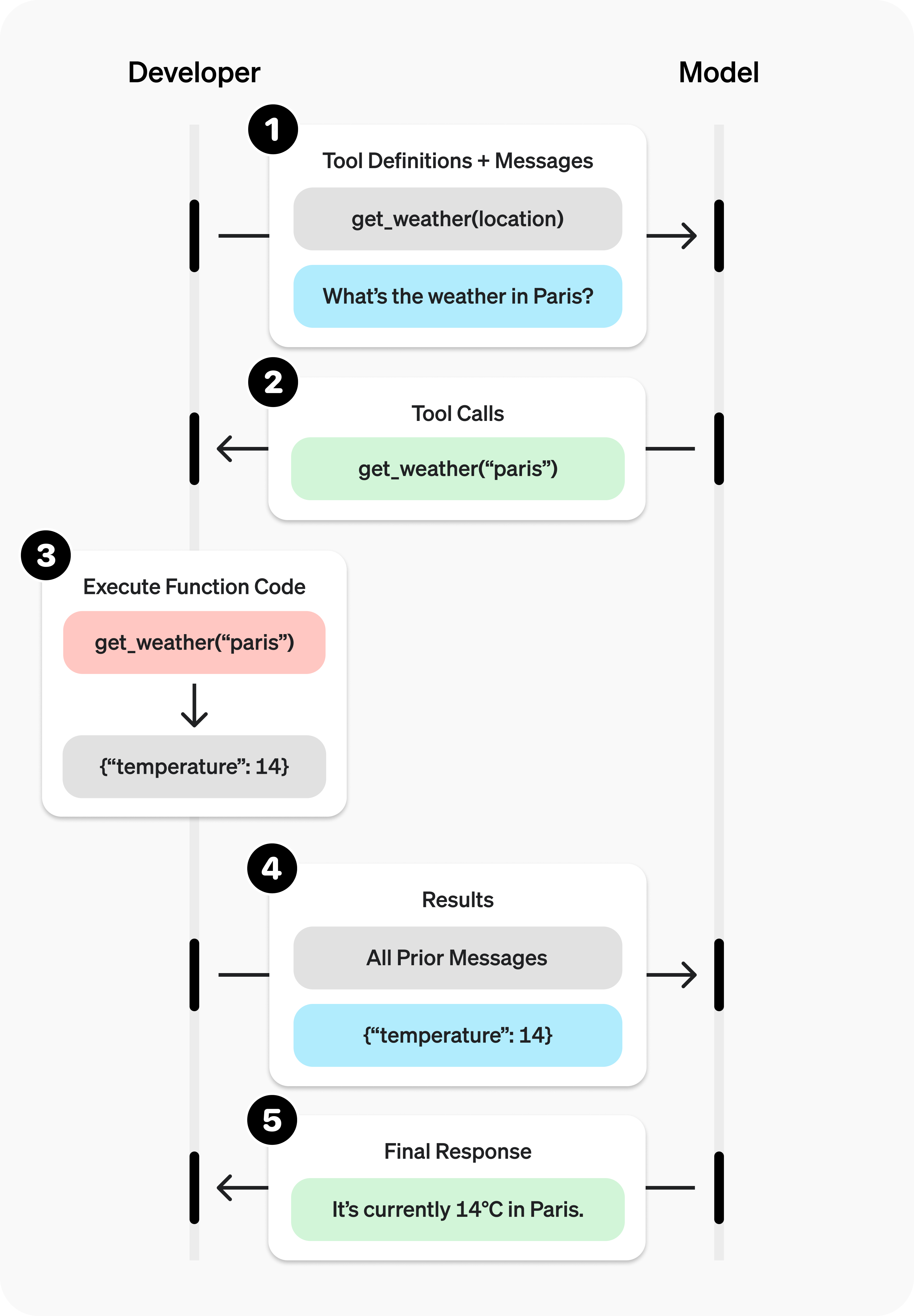
这个流程有一个非常重要的工程事实:模型不会替你执行函数,真正执行的是你的代码。
四、一个最小可用示例:星座运势函数
下面是官方文档给出的端到端示例。它定义了一个 get_horoscope 函数,模型先发起调用,你的应用执行后,再把结果喂回模型。
Chat Completions API 示例
from openai import OpenAI
import json

client = OpenAI()

# 1. Define a list of callable tools for the model
tools = [
    {
        "type": "function",
        "function": {
            "name": "get_horoscope",
            "description": "Get today's horoscope for an astrological sign.",
            "parameters": {
                "type": "object",
                "properties": {
                    "sign": {
                        "type": "string",
                        "description": "An astrological sign like Taurus or Aquarius",
                    },
                },
                "required": ["sign"],
                "additionalProperties": False,
            },
            "strict": True,
        },
    },
]

def get_horoscope(sign):
    return f"{sign}: Next Tuesday you will befriend a baby otter."

messages = [
    {"role": "user", "content": "What is my horoscope? I am an Aquarius."}
]

# 2. Prompt the model with tools defined
response = client.chat.completions.create(
    model="gpt-4.1",
    messages=messages,
    tools=tools,
)

messages.append(response.choices[0].message)

for tool_call in response.choices[0].message.tool_calls or []:
    if tool_call.function.name == "get_horoscope":
        # 3. Execute the function logic for get_horoscope
        args = json.loads(tool_call.function.arguments)
        horoscope = get_horoscope(args["sign"])

        # 4. Provide function call results to the model
        messages.append(
            {
                "role": "tool",
                "tool_call_id": tool_call.id,
                "content": json.dumps({"horoscope": horoscope}),
            }
        )

response = client.chat.completions.create(
    model="gpt-4.1",
    messages=messages,
    tools=tools,
)

# 5. The model should be able to give a response!
print(response.choices[0].message.content)
import OpenAI from "openai";

const openai = new OpenAI();

// 1. Define a list of callable tools for the model
const tools = [
  {
    type: "function",
    function: {
      name: "get_horoscope",
      description: "Get today's horoscope for an astrological sign.",
      parameters: {
        type: "object",
        properties: {
          sign: {
            type: "string",
            description: "An astrological sign like Taurus or Aquarius",
          },
        },
        required: ["sign"],
        additionalProperties: false,
      },
      strict: true,
    },
  },
];

function getHoroscope(sign) {
  return `${sign}: Next Tuesday you will befriend a baby otter.`;
}

const messages = [
  { role: "user", content: "What is my horoscope? I am an Aquarius." },
];

// 2. Prompt the model with tools defined
let response = await openai.chat.completions.create({
  model: "gpt-4.1",
  messages,
  tools,
});

messages.push(response.choices[0].message);

for (const toolCall of response.choices[0].message.tool_calls ?? []) {
  if (toolCall.function.name === "get_horoscope") {
    // 3. Execute the function logic for get_horoscope
    const args = JSON.parse(toolCall.function.arguments);
    const horoscope = getHoroscope(args.sign);

    // 4. Provide function call results to the model
    messages.push({
      role: "tool",
      tool_call_id: toolCall.id,
      content: JSON.stringify({ horoscope }),
    });
  }
}

response = await openai.chat.completions.create({
  model: "gpt-4.1",
  messages,
  tools,
});

// 5. The model should be able to give a response!
console.log(response.choices[0].message.content);
这个示例说明了函数调用最关键的边界:
- 模型负责决定“是否调用”和“调用参数是什么”
- 你的应用负责真正执行函数
- 结果必须显式回传给模型,它才能继续生成最终回答
五、Responses API 写法
如果你使用的是 Responses API,写法会更接近“把模型输出项和工具结果串起来”。
from openai import OpenAI
import json

client = OpenAI()

# 1. Define a list of callable tools for the model
tools = [
    {
        "type": "function",
        "name": "get_horoscope",
        "description": "Get today's horoscope for an astrological sign.",
        "parameters": {
            "type": "object",
            "properties": {
                "sign": {
                    "type": "string",
                    "description": "An astrological sign like Taurus or Aquarius",
                },
            },
            "required": ["sign"],
        },
    },
]

def get_horoscope(sign):
    return f"{sign}: Next Tuesday you will befriend a baby otter."

# Create a running input list we will add to over time
input_list = [
    {"role": "user", "content": "What is my horoscope? I am an Aquarius."}
]

# 2. Prompt the model with tools defined
response = client.responses.create(
    model="gpt-5",
    tools=tools,
    input=input_list,
)

# Save function call outputs for subsequent requests
input_list += response.output

for item in response.output:
    if item.type == "function_call":
        if item.name == "get_horoscope":
            # 3. Execute the function logic for get_horoscope
            sign = json.loads(item.arguments)["sign"]
            horoscope = get_horoscope(sign)

            # 4. Provide function call results to the model
            input_list.append({
                "type": "function_call_output",
                "call_id": item.call_id,
                "output": horoscope,
            })

print("Final input:")
print(input_list)

response = client.responses.create(
    model="gpt-5",
    instructions="Respond only with a horoscope generated by a tool.",
    tools=tools,
    input=input_list,
)

# 5. The model should be able to give a response!
print("Final output:")
print(response.model_dump_json(indent=2))
print("\n" + response.output_text)
import OpenAI from "openai";

const openai = new OpenAI();

// 1. Define a list of callable tools for the model
const tools = [
  {
    type: "function",
    name: "get_horoscope",
    description: "Get today's horoscope for an astrological sign.",
    parameters: {
      type: "object",
      properties: {
        sign: {
          type: "string",
          description: "An astrological sign like Taurus or Aquarius",
        },
      },
      required: ["sign"],
      additionalProperties: false,
    },
    strict: true,
  },
];

function getHoroscope(sign) {
  return `${sign}: Next Tuesday you will befriend a baby otter.`;
}

// Create a running input list we will add to over time
let input = [
  { role: "user", content: "What is my horoscope? I am an Aquarius." },
];

// 2. Prompt the model with tools defined
let response = await openai.responses.create({
  model: "gpt-5",
  tools,
  input,
});

// Preserve model output for the next turn
input.push(...response.output);

for (const item of response.output) {
  if (item.type !== "function_call") continue;

  if (item.name === "get_horoscope") {
    // 3. Execute the function logic for get_horoscope
    const { sign } = JSON.parse(item.arguments);
    const horoscope = getHoroscope(sign);

    // 4. Provide function call results to the model
    input.push({
      type: "function_call_output",
      call_id: item.call_id,
      output: horoscope,
    });
  }
}

console.log("Final input:");
console.log(JSON.stringify(input, null, 2));

response = await openai.responses.create({
  model: "gpt-5",
  instructions: "Respond only with a horoscope generated by a tool.",
  tools,
  input,
});

// 5. The model should be able to give a response!
console.log("Final output:");
console.log(response.output_text);
官方文档特别提醒:对于 GPT-5 或 o4-mini 这类 reasoning 模型,如果返回里包含 reasoning items,并且同时发生了工具调用,那么这些条目也必须一并带回后续请求。
六、如何定义函数:核心是 JSON Schema
函数通常通过请求里的 tools 参数声明。每个函数定义的关键字段如下:
| 字段 | 说明 |
|---|---|
type |
固定为 function |
name |
函数名,例如 get_weather |
description |
说明该函数在什么情况下用、怎么用 |
parameters |
使用 JSON Schema 定义输入参数 |
strict |
是否开启严格模式 |
一个典型的天气函数如下:
{
  "type": "function",
  "name": "get_weather",
  "description": "Retrieves current weather for the given location.",
  "parameters": {
    "type": "object",
    "properties": {
      "location": {
        "type": "string",
        "description": "City and country e.g. Bogotá, Colombia"
      },
      "units": {
        "type": "string",
        "enum": ["celsius", "fahrenheit"],
        "description": "Units the temperature will be returned in."
      }
    },
    "required": ["location", "units"],
    "additionalProperties": false
  },
  "strict": true
}
基于 JSON Schema,你可以利用这些能力:
- 基本类型约束
enum- 嵌套对象
- 字段描述
- 递归对象
如果你有多个同一领域工具,官方也支持用 namespace 进行分组,例如 crm、billing、shipping:
{
  "type": "namespace",
  "name": "crm",
  "description": "CRM tools for customer lookup and order management.",
  "tools": [
    {
      "type": "function",
      "name": "get_customer_profile",
      "description": "Fetch a customer profile by customer ID.",
      "parameters": {
        "type": "object",
        "properties": {
          "customer_id": { "type": "string" }
        },
        "required": ["customer_id"],
        "additionalProperties": false
      }
    },
    {
      "type": "function",
      "name": "list_open_orders",
      "description": "List open orders for a customer ID.",
      "defer_loading": true,
      "parameters": {
        "type": "object",
        "properties": {
          "customer_id": { "type": "string" }
        },
        "required": ["customer_id"],
        "additionalProperties": false
      }
    }
  ]
}
七、结构化输出与严格模式
OpenAI 在文档里明确建议:尽量始终开启 strict: true。
开启严格模式后,函数调用会更可靠地遵循 schema,而不是“尽力而为”。它底层依赖的是 structured outputs。
不过严格模式有两个硬性要求:
- 每个对象都必须设置
additionalProperties: false properties中所有字段都必须出现在required里
如果某个字段是可选的,可以通过把类型写成 ["string", "null"] 这种方式表达“允许为空”。
严格模式示例
{
    "type": "function",
    "function": {
        "name": "get_weather",
        "description": "Retrieves current weather for the given location.",
        "strict": true,
        "parameters": {
            "type": "object",
            "properties": {
                "location": {
                    "type": "string",
                    "description": "City and country e.g. Bogotá, Colombia"
                },
                "units": {
                    "type": ["string", "null"],
                    "enum": ["celsius", "fahrenheit"],
                    "description": "Units the temperature will be returned in."
                }
            },
            "required": ["location", "units"],
            "additionalProperties": false
        }
    }
}
非严格模式示例
{
    "type": "function",
    "function": {
        "name": "get_weather",
        "description": "Retrieves current weather for the given location.",
        "parameters": {
            "type": "object",
            "properties": {
                "location": {
                    "type": "string",
                    "description": "City and country e.g. Bogotá, Colombia"
                },
                "units": {
                    "type": "string",
                    "enum": ["celsius", "fahrenheit"],
                    "description": "Units the temperature will be returned in."
                }
            },
            "required": ["location"],
        }
    }
}
这里还有一个容易忽略的细节:
Responses API在你未显式设置时,会把 schema 规范化到严格模式语义Chat Completions API默认仍然是非严格模式
如果你在 Responses API 中想保留非严格、best-effort 的调用行为,需要显式设置 strict: false。
八、如何处理一个或多个函数调用
模型一次响应里可能没有工具调用,也可能有一个,或者多个。工程实现上,应该默认按“可能有多个”来处理。
Chat Completions 返回的 tool_calls
[
    {
        "id": "call_12345xyz",
        "type": "function",
        "function": {
            "name": "get_weather",
            "arguments": "{\"location\":\"Paris, France\"}"
        }
    },
    {
        "id": "call_67890abc",
        "type": "function",
        "function": {
            "name": "get_weather",
            "arguments": "{\"location\":\"Bogotá, Colombia\"}"
        }
    },
    {
        "id": "call_99999def",
        "type": "function",
        "function": {
            "name": "send_email",
            "arguments": "{\"to\":\"bob@email.com\",\"body\":\"Hi bob\"}"
        }
    }
]
for tool_call in completion.choices[0].message.tool_calls:
    name = tool_call.function.name
    args = json.loads(tool_call.function.arguments)

    result = call_function(name, args)
    messages.append({
        "role": "tool",
        "tool_call_id": tool_call.id,
        "content": str(result)
    })
for (const toolCall of completion.choices[0].message.tool_calls) {
    const name = toolCall.function.name;
    const args = JSON.parse(toolCall.function.arguments);

    const result = callFunction(name, args);
    messages.push({
        role: "tool",
        tool_call_id: toolCall.id,
        content: result.toString()
    });
}
Responses API 返回的 function_call
[
    {
        "id": "fc_12345xyz",
        "call_id": "call_12345xyz",
        "type": "function_call",
        "name": "get_weather",
        "arguments": "{\"location\":\"Paris, France\"}"
    },
    {
        "id": "fc_67890abc",
        "call_id": "call_67890abc",
        "type": "function_call",
        "name": "get_weather",
        "arguments": "{\"location\":\"Bogotá, Colombia\"}"
    },
    {
        "id": "fc_99999def",
        "call_id": "call_99999def",
        "type": "function_call",
        "name": "send_email",
        "arguments": "{\"to\":\"bob@email.com\",\"body\":\"Hi bob\"}"
    }
]
for tool_call in response.output:
    if tool_call.type != "function_call":
        continue

    name = tool_call.name
    args = json.loads(tool_call.arguments)

    result = call_function(name, args)
    input_messages.append({
        "type": "function_call_output",
        "call_id": tool_call.call_id,
        "output": str(result)
    })
for (const toolCall of response.output) {
    if (toolCall.type !== "function_call") {
        continue;
    }

    const name = toolCall.name;
    const args = JSON.parse(toolCall.arguments);

    const result = callFunction(name, args);
    input.push({
        type: "function_call_output",
        call_id: toolCall.call_id,
        output: result.toString()
    });
}
一个简单的分发函数可以写成这样:
def call_function(name, args):
    if name == "get_weather":
        return get_weather(**args)
    if name == "send_email":
        return send_email(**args)
const callFunction = async (name, args) => {
    if (name === "get_weather") {
        return getWeather(args.latitude, args.longitude);
    }
    if (name === "send_email") {
        return sendEmail(args.to, args.body);
    }
};
函数返回值通常建议用字符串承载,格式可以由你自己决定,例如:
- JSON 字符串
- 普通文本
- 错误码
- 成功/失败状态
如果函数返回的是图片或文件,也可以按官方文档要求传入图片对象或文件对象数组。
九、控制模型怎么选工具
默认情况下,模型会自己判断要不要调用工具,以及一次调用几个。你也可以用 tool_choice 主动约束。
auto:默认行为,可以调用 0 个、1 个或多个工具required:要求模型必须调用一个或多个工具- 指定函数:强制调用某一个函数
allowed_tools:只允许调用给定子集none:等价于不让模型使用工具
例如:
"tool_choice": {
    "type": "allowed_tools",
    "mode": "auto",
    "tools": [
        { "type": "function", "name": "get_weather" },
        { "type": "function", "name": "search_docs" }
    ]
  }
}
如果你在做 prompt caching,而又不想频繁改动完整工具列表,allowed_tools 会比较有用。
十、并行函数调用与限制
模型可能会在一次响应里发起多个函数调用。如果你不希望出现这种行为,可以设置:
"parallel_tool_calls": false
这样可以确保一次只会调用 0 个或 1 个工具。
需要注意几点:
- 使用 built-in tools 时,不支持并行函数调用
- 文档说明:如果你使用 fine-tuned model,并且模型在一轮里调用了多个函数,那么这些调用的
strict mode会被禁用 - 对于
gpt-4.1-nano-2025-04-14这个快照,官方建议在启用并行调用时要谨慎,因为它有时会对同一个工具重复发起多个调用
十一、流式函数调用:边生成参数边展示进度
流式模式适合在前端展示“模型正在调用哪个函数、参数正在怎么被填充”。
Chat Completions 流式示例
from openai import OpenAI

client = OpenAI()

tools = [{
    "type": "function",
    "function": {
        "name": "get_weather",
        "description": "Get current temperature for a given location.",
        "parameters": {
            "type": "object",
            "properties": {
                "location": {
                    "type": "string",
                    "description": "City and country e.g. Bogotá, Colombia"
                }
            },
            "required": ["location"],
            "additionalProperties": False
        },
        "strict": True
    }
}]

stream = client.chat.completions.create(
    model="gpt-4.1",
    messages=[{"role": "user", "content": "What's the weather like in Paris today?"}],
    tools=tools,
    stream=True
)

for chunk in stream:
    delta = chunk.choices[0].delta
    print(delta.tool_calls)
import { OpenAI } from "openai";

const openai = new OpenAI();

const tools = [{
    "type": "function",
    "function": {
        "name": "get_weather",
        "description": "Get current temperature for a given location.",
        "parameters": {
            "type": "object",
            "properties": {
                "location": {
                    "type": "string",
                    "description": "City and country e.g. Bogotá, Colombia"
                }
            },
            "required": ["location"],
            "additionalProperties": false
        },
        "strict": true
    }
}];

const stream = await openai.chat.completions.create({
    model: "gpt-4.1",
    messages: [{ role: "user", content: "What's the weather like in Paris today?" }],
    tools,
    stream: true,
    store: true,
});

for await (const chunk of stream) {
    const delta = chunk.choices[0].delta;
    console.log(delta.tool_calls);
}
流式返回的 arguments 会以增量方式到达,例如:
[{"index": 0, "id": "call_DdmO9pD3xa9XTPNJ32zg2hcA", "function": {"arguments": "", "name": "get_weather"}, "type": "function"}]
[{"index": 0, "id": null, "function": {"arguments": "{\"", "name": null}, "type": null}]
[{"index": 0, "id": null, "function": {"arguments": "location", "name": null}, "type": null}]
[{"index": 0, "id": null, "function": {"arguments": "\":\"", "name": null}, "type": null}]
[{"index": 0, "id": null, "function": {"arguments": "Paris", "name": null}, "type": null}]
[{"index": 0, "id": null, "function": {"arguments": ",", "name": null}, "type": null}]
[{"index": 0, "id": null, "function": {"arguments": " France", "name": null}, "type": null}]
[{"index": 0, "id": null, "function": {"arguments": "\"}", "name": null}, "type": null}]
null
因此你需要自己把这些 delta 聚合成完整参数对象:
final_tool_calls = {}

for chunk in stream:
    for tool_call in chunk.choices[0].delta.tool_calls or []:
        index = tool_call.index

        if index not in final_tool_calls:
            final_tool_calls[index] = tool_call

        final_tool_calls[index].function.arguments += tool_call.function.arguments
const finalToolCalls = {};

for await (const chunk of stream) {
    const toolCalls = chunk.choices[0].delta.tool_calls || [];
    for (const toolCall of toolCalls) {
        const { index } = toolCall;

        if (!finalToolCalls[index]) {
            finalToolCalls[index] = toolCall;
        }

        finalToolCalls[index].function.arguments += toolCall.function.arguments;
    }
}
聚合完成后会得到类似这样的结果:
{
    "index": 0,
    "id": "call_RzfkBpJgzeR0S242qfvjadNe",
    "function": {
        "name": "get_weather",
        "arguments": "{\"location\":\"Paris, France\"}"
    }
}
Responses API 流式示例
Responses API 的流式模式不是 delta.tool_calls,而是一组事件流。
from openai import OpenAI

client = OpenAI()

tools = [{
    "type": "function",
    "name": "get_weather",
    "description": "Get current temperature for a given location.",
    "parameters": {
        "type": "object",
        "properties": {
            "location": {
                "type": "string",
                "description": "City and country e.g. Bogotá, Colombia"
            }
        },
        "required": [
            "location"
        ],
        "additionalProperties": False
    }
}]

stream = client.responses.create(
    model="gpt-4.1",
    input=[{"role": "user", "content": "What's the weather like in Paris today?"}],
    tools=tools,
    stream=True
)

for event in stream:
    print(event)
import { OpenAI } from "openai";

const openai = new OpenAI();

const tools = [{
    type: "function",
    name: "get_weather",
    description: "Get current temperature for provided coordinates in celsius.",
    parameters: {
        type: "object",
        properties: {
            latitude: { type: "number" },
            longitude: { type: "number" }
        },
        required: ["latitude", "longitude"],
        additionalProperties: false
    },
    strict: true
}];

const stream = await openai.responses.create({
    model: "gpt-4.1",
    input: [{ role: "user", content: "What's the weather like in Paris today?" }],
    tools,
    stream: true,
    store: true,
});

for await (const event of stream) {
    console.log(event)
}
对应事件可能长这样:
{"type":"response.output_item.added","response_id":"resp_1234xyz","output_index":0,"item":{"type":"function_call","id":"fc_1234xyz","call_id":"call_1234xyz","name":"get_weather","arguments":""}}
{"type":"response.function_call_arguments.delta","response_id":"resp_1234xyz","item_id":"fc_1234xyz","output_index":0,"delta":"{\""}
{"type":"response.function_call_arguments.delta","response_id":"resp_1234xyz","item_id":"fc_1234xyz","output_index":0,"delta":"location"}
{"type":"response.function_call_arguments.delta","response_id":"resp_1234xyz","item_id":"fc_1234xyz","output_index":0,"delta":"\":\""}
{"type":"response.function_call_arguments.delta","response_id":"resp_1234xyz","item_id":"fc_1234xyz","output_index":0,"delta":"Paris"}
{"type":"response.function_call_arguments.delta","response_id":"resp_1234xyz","item_id":"fc_1234xyz","output_index":0,"delta":","}
{"type":"response.function_call_arguments.delta","response_id":"resp_1234xyz","item_id":"fc_1234xyz","output_index":0,"delta":" France"}
{"type":"response.function_call_arguments.delta","response_id":"resp_1234xyz","item_id":"fc_1234xyz","output_index":0,"delta":"\"}"}
{"type":"response.function_call_arguments.done","response_id":"resp_1234xyz","item_id":"fc_1234xyz","output_index":0,"arguments":"{\"location\":\"Paris, France\"}"}
{"type":"response.output_item.done","response_id":"resp_1234xyz","output_index":0,"item":{"type":"function_call","id":"fc_1234xyz","call_id":"call_1234xyz","name":"get_weather","arguments":"{\"location\":\"Paris, France\"}"}}
聚合方式如下:
final_tool_calls = {}

for event in stream:
    if event.type === 'response.output_item.added':
        final_tool_calls[event.output_index] = event.item;
    elif event.type === 'response.function_call_arguments.delta':
        index = event.output_index

        if final_tool_calls[index]:
            final_tool_calls[index].arguments += event.delta
const finalToolCalls = {};

for await (const event of stream) {
    if (event.type === 'response.output_item.added') {
        finalToolCalls[event.output_index] = event.item;
    } else if (event.type === 'response.function_call_arguments.delta') {
        const index = event.output_index;

        if (finalToolCalls[index]) {
            finalToolCalls[index].arguments += event.delta;
        }
    }
}
十二、自定义工具:不一定非要 JSON 参数
除了 function,官方还支持 custom 工具。它和函数工具最大的区别是:模型返回给工具的输入可以是任意字符串,而不是必须符合 JSON Schema 的参数对象。
这适合哪些场景?
- 你希望模型直接产出一段代码
- 你希望模型输出符合某种文本语法
- 你不想把简单文本强行包成 JSON
自定义工具示例
from openai import OpenAI

client = OpenAI()

response = client.responses.create(
    model="gpt-5",
    input="Use the code_exec tool to print hello world to the console.",
    tools=[
        {
            "type": "custom",
            "name": "code_exec",
            "description": "Executes arbitrary Python code.",
        }
    ]
)
print(response.output)
import OpenAI from "openai";
const client = new OpenAI();

const response = await client.responses.create({
  model: "gpt-5",
  input: "Use the code_exec tool to print hello world to the console.",
  tools: [
    {
      type: "custom",
      name: "code_exec",
      description: "Executes arbitrary Python code.",
    },
  ],
});

console.log(response.output);
返回结果会是一个 custom_tool_call,输入是普通文本:
[
  {
    "id": "rs_6890e972fa7c819ca8bc561526b989170694874912ae0ea6",
    "type": "reasoning",
    "content": [],
    "summary": []
  },
  {
    "id": "ctc_6890e975e86c819c9338825b3e1994810694874912ae0ea6",
    "type": "custom_tool_call",
    "status": "completed",
    "call_id": "call_aGiFQkRWSWAIsMQ19fKqxUgb",
    "input": "print(\"hello world\")",
    "name": "code_exec"
  }
]
十三、用 grammar 约束自定义工具输入
对于自定义工具,官方支持通过 grammar 约束模型输出,使其只能生成符合某种上下文无关文法的文本。
目前支持两种语法:
larkregex
Lark grammar 示例
from openai import OpenAI

client = OpenAI()

grammar = """
start: expr
expr: term (SP ADD SP term)* -> add
| term
term: factor (SP MUL SP factor)* -> mul
| factor
factor: INT
SP: " "
ADD: "+"
MUL: "*"
%import common.INT
"""

response = client.responses.create(
    model="gpt-5",
    input="Use the math_exp tool to add four plus four.",
    tools=[
        {
            "type": "custom",
            "name": "math_exp",
            "description": "Creates valid mathematical expressions",
            "format": {
                "type": "grammar",
                "syntax": "lark",
                "definition": grammar,
            },
        }
    ]
)
print(response.output)
import OpenAI from "openai";
const client = new OpenAI();

const grammar = `
start: expr
expr: term (SP ADD SP term)* -> add
| term
term: factor (SP MUL SP factor)* -> mul
| factor
factor: INT
SP: " "
ADD: "+"
MUL: "*"
%import common.INT
`;

const response = await client.responses.create({
  model: "gpt-5",
  input: "Use the math_exp tool to add four plus four.",
  tools: [
    {
      type: "custom",
      name: "math_exp",
      description: "Creates valid mathematical expressions",
      format: {
        type: "grammar",
        syntax: "lark",
        definition: grammar,
      },
    },
  ],
});

console.log(response.output);
结果会被约束为符合该 grammar 的输入,例如:
[
  {
    "id": "rs_6890ed2b6374819dbbff5353e6664ef103f4db9848be4829",
    "type": "reasoning",
    "content": [],
    "summary": []
  },
  {
    "id": "ctc_6890ed2f32e8819daa62bef772b8c15503f4db9848be4829",
    "type": "custom_tool_call",
    "status": "completed",
    "call_id": "call_pmlLjmvG33KJdyVdC4MVdk5N",
    "input": "4 + 4",
    "name": "math_exp"
  }
]
Regex grammar 示例
from openai import OpenAI

client = OpenAI()

grammar = r"^(?P<month>January|February|March|April|May|June|July|August|September|October|November|December)\s+(?P<day>\d{1,2})(?:st|nd|rd|th)?\s+(?P<year>\d{4})\s+at\s+(?P<hour>0?[1-9]|1[0-2])(?P<ampm>AM|PM)$"

response = client.responses.create(
    model="gpt-5",
    input="Use the timestamp tool to save a timestamp for August 7th 2025 at 10AM.",
    tools=[
        {
            "type": "custom",
            "name": "timestamp",
            "description": "Saves a timestamp in date + time in 24-hr format.",
            "format": {
                "type": "grammar",
                "syntax": "regex",
                "definition": grammar,
            },
        }
    ]
)
print(response.output)
import OpenAI from "openai";
const client = new OpenAI();

const grammar = "^(?P<month>January|February|March|April|May|June|July|August|September|October|November|December)\s+(?P<day>\d{1,2})(?:st|nd|rd|th)?\s+(?P<year>\d{4})\s+at\s+(?P<hour>0?[1-9]|1[0-2])(?P<ampm>AM|PM)$";

const response = await client.responses.create({
  model: "gpt-5",
  input: "Use the timestamp tool to save a timestamp for August 7th 2025 at 10AM.",
  tools: [
    {
      type: "custom",
      name: "timestamp",
      description: "Saves a timestamp in date + time in 24-hr format.",
      format: {
        type: "grammar",
        syntax: "regex",
        definition: grammar,
      },
    },
  ],
});

console.log(response.output);
输出会类似:
[
  {
    "id": "rs_6894f7a3dd4c81a1823a723a00bfa8710d7962f622d1c260",
    "type": "reasoning",
    "content": [],
    "summary": []
  },
  {
    "id": "ctc_6894f7ad7fb881a1bffa1f377393b1a40d7962f622d1c260",
    "type": "custom_tool_call",
    "status": "completed",
    "call_id": "call_8m4XCnYvEmFlzHgDHbaOCFlK",
    "input": "August 7th 2025 at 10AM",
    "name": "timestamp"
  }
]
文档还特别说明:
- grammar 使用的是 Rust regex crate syntax,不是 Python
re - grammar 过于复杂时,API 可能直接报错
- Lark 并不是完整支持,部分特性不可用
十四、最佳实践:把模型当成“参数规划器”,不是业务执行器
官方文档里关于函数定义和调用,最值得落实到工程里的建议主要有这些。
1. 函数名、参数名、描述都要写清楚
- 函数用途要明确
- 参数格式要明确
- 返回结果代表什么要明确
- 系统提示词里要说明“什么时候用、什么时候不要用”
如果你发现模型总是在某个边界条件下调用错误,优先补充描述、示例和约束,而不是立刻怀疑模型本身。
2. 用 schema 消灭无效状态
例如不要设计这种接口:
toggle_light(on: bool, off: bool)
因为它天然允许无效组合。更好的方式是让 schema 本身表达真实业务约束,比如用枚举或单一明确参数。
3. 已知参数不要再让模型猜
如果某个 order_id 已经由你的业务流程确定,就不要再把它暴露给模型去填。你的代码直接注入就行。
这是函数调用里一个非常重要的原则:能由程序确定的,就不要交给模型推断。
4. 总是顺序调用的能力可以合并
如果 query_location() 后面一定会接 mark_location(),那就考虑合成一个更高层函数,减少模型决策负担。
5. 初始可见工具数量尽量少
官方建议是一个 soft suggestion:单轮开始时尽量少于 20 个工具。工具越多,模型选错的概率越高,token 消耗也越大。
如果工具很多,优先考虑 tool search 延迟加载。
6. 关注 token 成本
函数定义本质上会被注入系统消息,因此:
- 会占用上下文窗口
- 会计入输入 token
- schema 越长,成本越高
如果你碰到 token 限制或成本过高,官方建议:
- 减少初始加载的工具数量
- 缩短描述
- 使用
tool_search - 在某些场景下考虑 fine-tuning 提升函数调用准确率
十五、几个容易踩坑的点
最后把文档里最容易被忽略、但在工程里非常关键的点集中列一下。
- 模型不会真的执行函数,执行方始终是你的应用。
- 一次响应可能包含多个工具调用,不要只按单调用写逻辑。
- 严格模式下,schema 不满足约束会直接报错,不是“尽力兼容”。
Responses API与Chat Completions API在严格模式默认行为上并不相同。- 使用 reasoning 模型时,带工具调用的 reasoning items 需要在后续请求中保留。
- 并行工具调用并不总是适合生产场景,尤其在有副作用的操作上要谨慎。
- 自定义 grammar 越复杂,越容易超出支持范围或导致模型输出语义跑偏。
十六、结语
如果只用一句话总结 Function Calling,那就是:
让模型负责理解意图和组织参数,让应用负责真实执行和状态控制。
这也是把大模型接入真实业务系统时最稳妥的边界划分。
当你把 schema、工具粒度、错误处理、流式聚合和权限边界都设计好以后,函数调用就不只是“让模型会调用工具”,而是可以逐步演进成一套可靠的 AI Agent 执行基础设施。
进一步阅读: